Getting started
Before you start: disable other rental apps
Before using The Dress Rental App, disable or uninstall any other rental apps. Two rental apps on one store will conflict on your product pages and at checkout.
- In Shopify Admin, go to Settings → Apps and sales channels.
- Open each existing rental app and disable or uninstall it.
- Go to Online Store → Themes → Customize.
- Remove any old rental app blocks from your templates and turn off their app embeds.
- Save your theme changes.
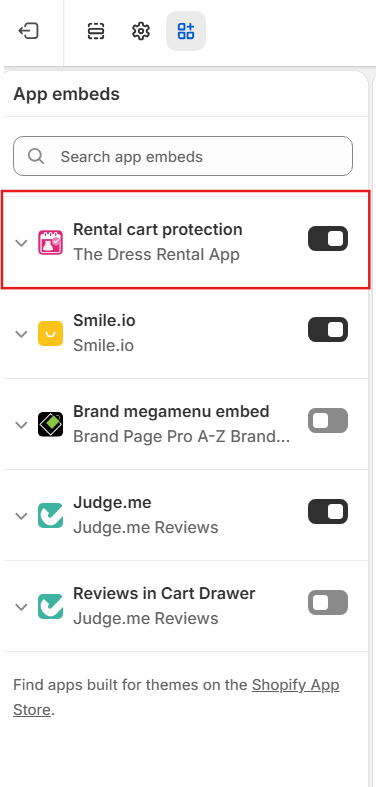
- Under App embeds, make sure Rental cart protection (The Dress Rental App) is switched on.
- Open a product page and confirm the widget works.
Stuck? Email dresshirewebsites@gmail.com and we'll help remove the old app.
Don't have a Shopify store yet?
The Dress Rental App only works on Shopify. Start a free Shopify trial, set up your store, then install the app. Prefer not to do it yourself? Our website package builds your Shopify rental store with the app set up for you.
The Shopify trial link is a referral link. We may earn a commission if you sign up, at no extra cost to you.