For formal & evening wear hire
Formal and evening dress hire software for Shopify
Formal season means the same dresses booked for back-to-back events, in multiple sizes, often posted interstate. The Dress Rental App keeps every date, size and postage window straight, right inside your Shopify store.
The challenge
Formal hire is busy, seasonal and unforgiving
School formals, balls, galas, races and wedding season all land on the same weekends. One missed return or double-booked dress means a customer with nothing to wear on the night.
Peak weekends
Popular styles get booked for consecutive events, so you need exact dates and turnaround time between hires.
Same style, many sizes
A best-selling gown might come in five sizes, each with its own bookings and stock.
Posting before the event
Dresses need to arrive before the event and come back in time for cleaning and the next booking.
Customers shop by date
Customers search with their event date in mind and only want to see what's actually free.
How the app helps
Built for formal wear rentals
Automatic date blocking
Booked dates are blocked the moment an order comes in, including the buffer days before and after for postage and cleaning. Delivery rules
Inventory by size
Track each size separately with Inventory by Variant, so booking a size 8 doesn't block the size 12. Rental settings
Rental lengths and prices
Offer 4-day and 8-day hires (or any length) with a price for each. Duration-based rentals
Search by event date
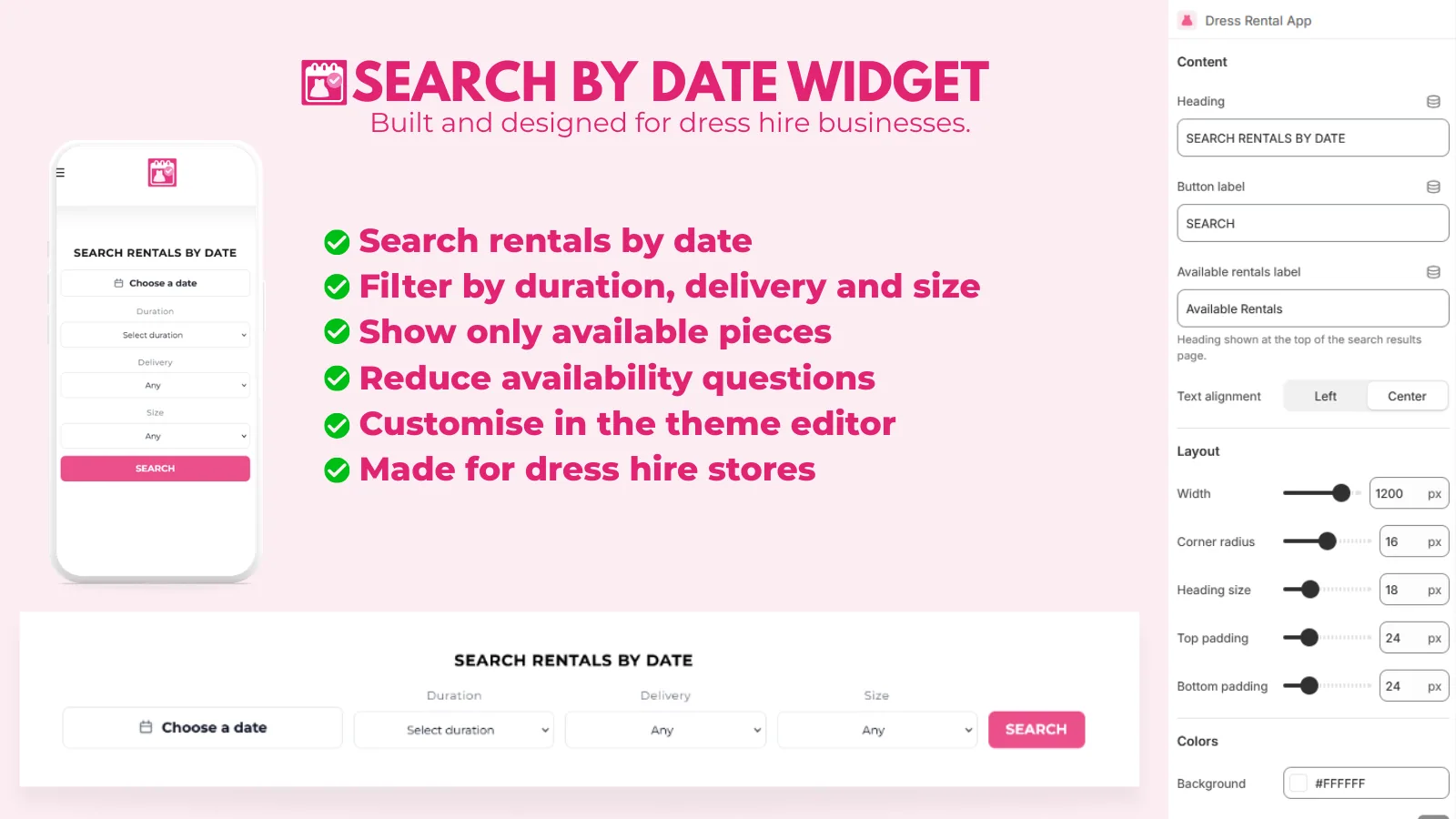
A storefront search where customers pick their date, size and delivery method and see only available dresses. Search by Date
Weekly postage cut-offs
Stop late bookings that can't be posted in time, with a message explaining why. Booking cut-offs
Bonds, cleaning and late fees
Add a refundable bond and cleaning fee to every hire, and charge late fees when dresses come back late. Late fees and bonds
Get set up for formal season
- Install the appInstall from the Shopify App Store and run the quick setup wizard.
- Set delivery rulesAdd your postage method, lead time and buffer days so dresses arrive and return on time.
- Import your dressesBulk import by product type, with sizes and rental lengths as Shopify variants.
- Add the calendarAdd the Rental Widget to your product page and the Search by Date block to your home page.
FAQ
Formal dress hire questions
Can the same dress be booked for back-to-back events?
Yes, as long as the dates don't overlap once your buffer days are included. Set a buffer before the rental for posting and after it for returns and cleaning, and the calendar only offers dates that leave enough time.
How do I handle a dress that comes in several sizes?
Create the sizes as Shopify variants and choose Inventory by Variant in the app. Each size then has its own availability.
Can customers search for dresses available on their formal date?
Yes. The Search by Date widget, on the Starter plan and above, lets customers choose their date, duration, delivery method and size and shows only dresses that are free.
What happens during our busiest weeks?
Choose a plan with enough monthly bookings. The Growth plan covers 100 bookings a month and Big Business is unlimited. You can change plans at any time.
Take rental bookings on Shopify
Install The Dress Rental App and start on the free plan, or let us build your whole rental website.